Building an Apache Arrow Flight SQL Server in Java
November 16, 2025

Apache Arrow defines a language-independent columnar memory format for flat and nested data, organized for efficient analytic operations on modern hardware like CPUs and GPUs. The Apache Arrow memory format also supports zero-copy reads for lightning-fast data access without serialization overhead.
Apache Arrow is the standard for operating at speed with data. All major data platforms support the format. On top of the memory format, the Apache Arrow project defines two protocols: Apache Arrow Flight and Apache Arrow Flight SQL. Apache Arrow Flight focuses on transferring data from a (set of) server(s) to a client. Apache Arrow Flight SQL extends this protocol with higher-level primitives typically found in a relational database (thus the name Flight SQL).
In this post, we will explore how to build a simple relational database using Apache Arrow Flight SQL and Apache DataFusion (a relational query engine). In particular, we’ll be using the Java programming language, with the Apache Arrow Java implementation, and the DataFusion Java bindings, which are not yet officially part of Apache Arrow or Apache DataFusion but live in the DataFusion-Contrib repository.
Why Apache Arrow?
Apache Arrow emerged from the need to transfer data efficiently across systems and programming languages. In a world where each data system implements its own serialization format and code to communicate with the outside world, only inefficiency can follow.
A lot of engineering time and resources are wasted on translation. So much time was wasted on transforming data from one layout to another that it consumed the majority of computing time.
With Apache Arrow, you can now push and pull data from Pandas in Python to DuckDB in C++ to Spark in Java without any performance penalties.
In other words, Apache Arrow has transformed the data space and sparked a lot of innovation. Knowing Apache Arrow is vital when building a data system or integrating into the current data processing landscape.
Apache Arrow Flight
Apache Arrow Flight is a high-performance protocol for transporting large datasets over a network. Built on top of gRPC, Flight leverages the Apache Arrow memory format to enable zero-copy data transfer, eliminating serialization overhead. This makes it ideal for distributed data systems where performance and efficiency are critical.
Key Features of Apache Arrow Flight
-
Zero-Copy Data Transfer: Flight uses the Apache Arrow memory format to transfer data without serialization, reducing CPU usage and latency.
-
Batched Data Transfer: Data is transferred in chunks (batches), allowing for efficient memory usage and parallel processing.
-
Authentication and Encryption: Flight supports TLS and custom authentication mechanisms, ensuring secure data transfer.
-
Location Transparency: Clients can dynamically discover and connect to Flight servers, enabling flexible deployment topologies.
-
Cross-Language Compatibility: Flight is language-agnostic, with implementations available in Java, Python, C++, and more.
Internals of Apache Arrow Flight
Apache Arrow Flight offers three basic building blocks:
-
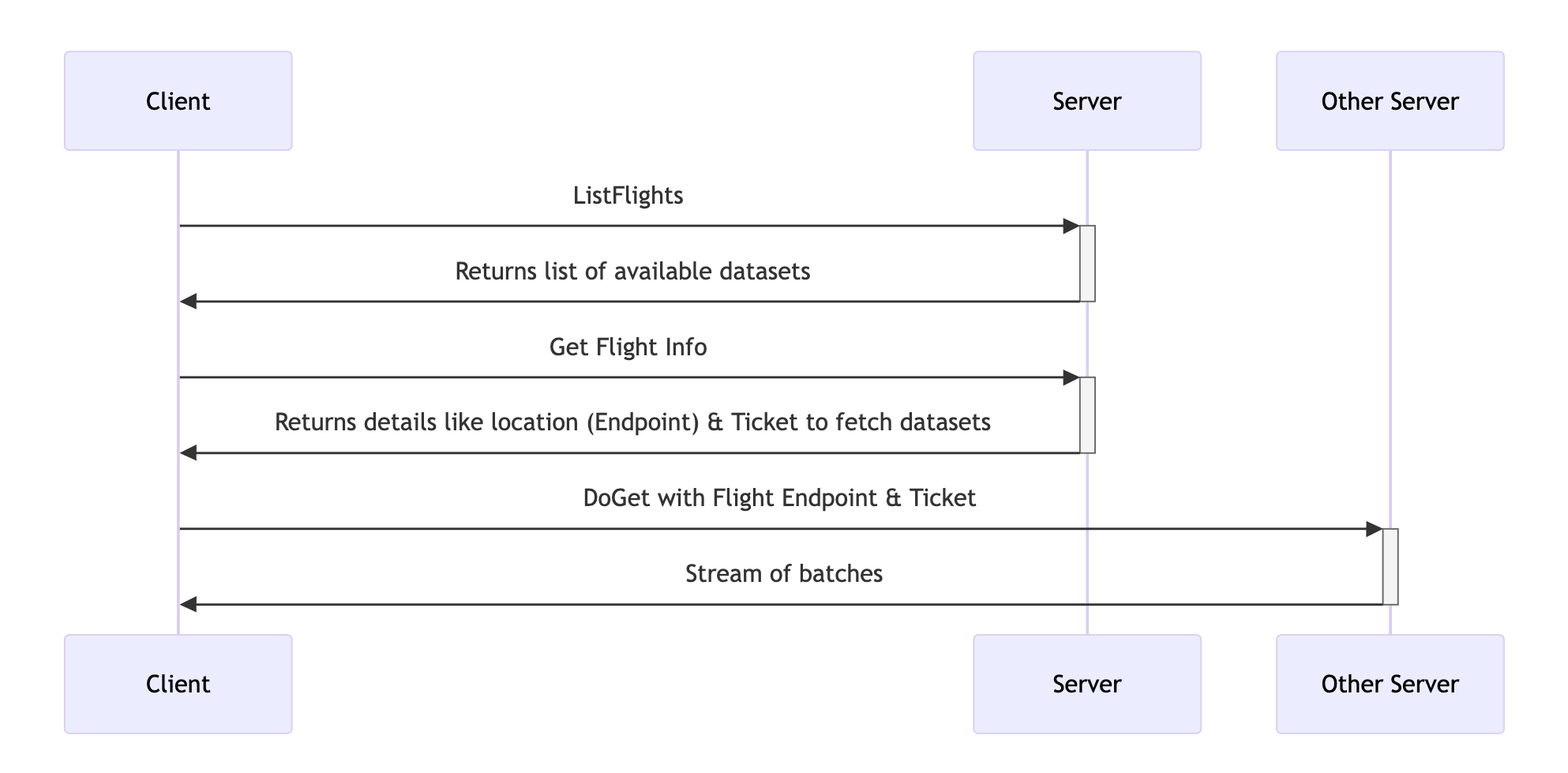
Getting Data: A dataset is called a Flight. A Flight has an Endpoint and can be fetched with a Ticket. Meaning that a dataset does not have to reside on the same machine as the one giving the information about the Flight.
-
List Flights: gives back a list of all the known flights. If you’ re building a file server this makes sense, because you know all the datasets. For a data system this typically makes less sense, as the dataset depend on the queries being asked by the client.
-
Get Flight Info: Returns where to find a particular flight. Do note, that the flight does not need to be listed. It provides location transparency, because the Flight Info can point to another server. Meaning you can have a controller node that points to data nodes, to distribute the load over mulitple nodes.
-
Do Get: Based on the Flight Info retrieved, effectively get the dataset. This initiates a stream of RecordBatches from Server to Client.
-
-
Putting Data: Upload a stream of RecordBatches to the Server. You can define metadata in the upload. Again, for a file server this makes total sense. For a data system, thinking of this as an insert or copy statement.
-
Actions: Apache Arrow Flight allows for arbitrary Actions to be implemented by the server and invoked by the client. This is absolutely free style remote procedure calling. The server is completely responsible in implementing and securing these actions.
This mechanism allows for a lot of flexibility in implementing protocols on top of Apache Arrow Flight (as we will see with Flight SQL).
Apache Arrow Flight SQL
Apache Arrow Flight SQL extends the Apache Arrow Flight protocol by adding database-specific functionality. It provides a standardized way to execute SQL queries, fetch metadata, and interact with (relational) data sources. Flight SQL is designed to bridge the gap between traditional SQL databases and modern, high-performance data systems.
Concepts
Apache Arrow Flight SQL builds upon the three pillars of Apache Arrow Flight:
getting, putting and actions. For each of the three pillars Flight SQL uses the
primitive and implements dynamic dispatching on top of it. As an example, this
is the code in the interface FlightSqlProducer:
default FlightInfo getFlightInfo(FlightProducer.CallContext context, FlightDescriptor descriptor) {
    Any command = FlightSqlUtils.parseOrThrow(descriptor.getCommand());
    if (command.is(FlightSql.CommandStatementQuery.class)) {
        return this.getFlightInfoStatement(
          (FlightSql.CommandStatementQuery)FlightSqlUtils.unpackOrThrow(command, FlightSql.CommandStatementQuery.class), context, descriptor);
    } else if (command.is(FlightSql.CommandStatementSubstraitPlan.class)) {
        return this.getFlightInfoSubstraitPlan(
          (FlightSql.CommandStatementSubstraitPlan)FlightSqlUtils.unpackOrThrow(command, FlightSql.CommandStatementSubstraitPlan.class), context, descriptor);
    } else if (command.is(FlightSql.CommandPreparedStatementQuery.class)) {
        return this.getFlightInfoPreparedStatement(
          (FlightSql.CommandPreparedStatementQuery)FlightSqlUtils.unpackOrThrow(command, FlightSql.CommandPreparedStatementQuery.class), context, descriptor);
    } else if (command.is(FlightSql.CommandGetCatalogs.class)) {
        return this.getFlightInfoCatalogs(
          (FlightSql.CommandGetCatalogs)FlightSqlUtils.unpackOrThrow(command, FlightSql.CommandGetCatalogs.class), context, descriptor);
    } else if (command.is(FlightSql.CommandGetDbSchemas.class)) {
        return this.getFlightInfoSchemas(
          (FlightSql.CommandGetDbSchemas)FlightSqlUtils.unpackOrThrow(command, FlightSql.CommandGetDbSchemas.class), context, descriptor);
    } else if (command.is(FlightSql.CommandGetTables.class)) {
      // Truncated for readability
    }
}
It implements the getFlightInfo function of the interface FlightProducer.
Parses the command that it given in the FlightDescriptor, and handles the
parsed command by mapping it to the known commands. E.g., one for executing a
query (CommandStatementQuery), one for getting the catalog
(CommandGetCatalogs) and so forth.
The upside here is that if we implement those commands, any client that speaks Flight SQL, will be able to discover our data system.
A Minimal Viable Relational Database
In this section, we build a simple relational database using Apache Arrow
Flight SQL and DataFusion. Our database will support SQL SELECT-queries and
expose them via a Flight SQL server.
How It Works
-
DataFusion as the Query Engine: DataFusion is a Rust-based query engine that supports SQL and DataFrame APIs. It compiles SQL queries into optimized physical plans and executes them efficiently. The Java bindings allow us to embed DataFusion in a Java application.
- Apache Arrow Flight SQL Server:
We’ll implement a Flight SQL server in Java that wraps DataFusion. The server will:
- Accept SQL queries from clients.
- Pass queries to DataFusion for execution.
- Return results in Arrow format.
- File-based Storage: For simplicity, we keep tables in a single file and a table can be written to only once (on creation). This frees us from all the storage mechanisms that are very essential to modern databases, but that are not so easy to implement correctly and that would distract us more than they would benefit us.
How to Implement
The source code can be found in this GitHub repository: it implements a basic, bare bone Apache Arrow Flight SQL server storing files in Apache Arrow IPC format.
The essential part of the implementation is the Producer which extends the
BasicFlightSqlProducer, which is an abstract class on top of the
FlightSqlProducer we discussed earlier. This class implements a few key
functions to make the database magic happen:
-
acceptPutStatementBulkIngest: accepts aFlightStream, a stream ofRecordBatches, containing new data. By convention, the table name is defined in the command. The function reads the stream and writes it to disk.This is the first and last time that we touch this table. The file remains as is on disk. For a real database that would be a no-go, but we are focusing on the database interface part: accepting, executing and delivering result for SQL queries, using Flight SQL and DataFusion.
-
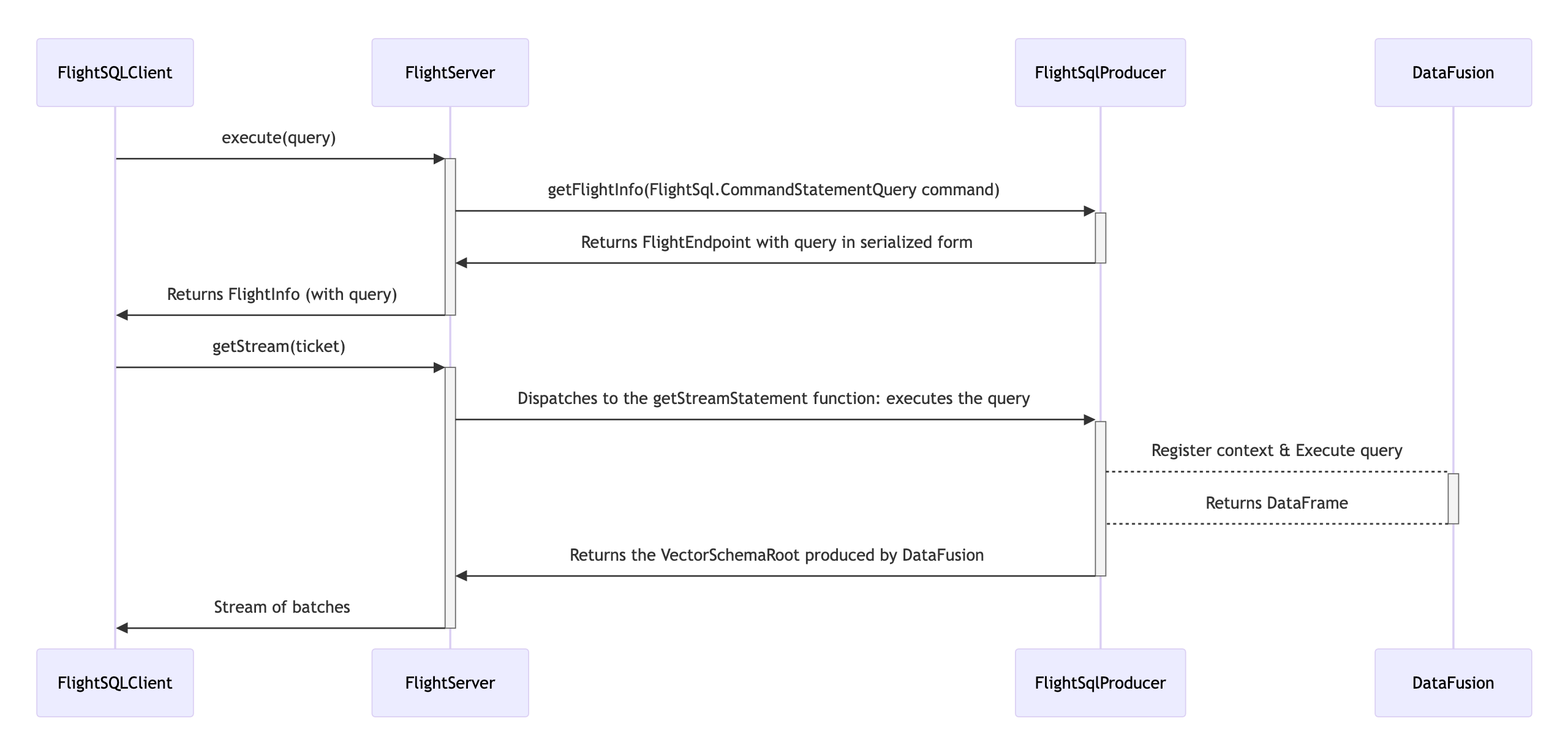
getStreamStatement: executes a given query using Apache DataFusion and returns the result.The quintessential part of our little database is:
try (var ctx = SessionContexts.create()) {
    // Registering all tables!
    for (Map.Entry<String, Path> entry : this.tables.entrySet()) {
        ctx.registerTable(
            entry.getKey(),
            new ListingTable(
                new ListingTableConfig.Builder(dataDir.toString())
                    .withListingOptions(ListingOptions.builder(new ArrowFormat()).build()).build(ctx).get()
            )
        );
    }

    // Executing the statement in the context of the tables
    LOGGER.info("Query = {}", ticket.getStatementHandle().toStringUtf8()
    );
    CompletableFuture<DataFrame> result = ctx.sql(ticket.getStatementHandle().toStringUtf8());

    // Reading the whole result into a single DataFrame and returning the
    // VectorSchemaRoot to the client!
    DataFrame dataFrame = result.get();
    ArrowReader reader = dataFrame.collect(allocator).get();

    listener.start(reader.getVectorSchemaRoot());
    while (reader.loadNextBatch()) {
        listener.putNext();
    }
    listener.completed();
}
Adding all the known “tables” (a.k.a. files) to the DataFusion context and executing the query using in that context (
ctx.sql(...)).Here we apply the
collectfunction on the dataframe, because we don’t have any other option. Ideally, we would be using a streaming execution as is available in the Python and Rust clients for DataFusion. -
getFlightInfoStatement: I’ve opted to keep this part very minimal. The Get Flight Info consists of repackaging the query (FlightSql.TicketStatementQuery) into aTicketand sending it back to the client. The client then offers the ticket to the function above, which executes the query.Ideally, we have a more extensive Java API on DataFusion. Then we would be able to parse the query and provide a schema to the client ahead of execution.
Final Thoughts
The data landscape is evolving rapidly, and Apache Arrow is at the forefront of this transformation. By adopting Apache Arrow and Flight SQL, you can future-proof your data systems and unlock new levels of performance and interoperability. Whether you’re building a new database, integrating with existing systems, or optimizing data pipelines, Apache Arrow provides the tools you need to succeed.
Despite all of its short comings, this implementation gives you an introduction into features of Apache Flight SQL and Apache DataFusion to build a (very rudimentary) database in Java. This example serves as a stepping stone for more complex and robust implementations.
Further Reading
-
Apache Arrow Documentation: The documentation of the Apache Arrow project
-
Arrow Flight SQL Specification: Specification of the Apache Arrow Flight SQL protocol, containing all messages and commands.
-
DataFusion Java Bindings: Java bindings for the Rust based Apache DataFusion query engine. The bindings are pretty limited and outdated, but useful nonetheless.
-
Arrow Cookbook (Java): Apache Arrow Cookbook, containing elaborate code snippets for accomplishing common feats with Apache Arrow and Java.