Coding Agents
April 19, 2026

You might have heard about Coding Agents, the newest wagon on the Generative AI hype train. What is a coding agent? Should you care?
I started using LLMs in IntelliJ, then Coding Agents (Anti-Gravity, Claude Code, GitHub CoPilot in IntelliJ, Gemini CLI, and Mistral Vibe Coding) and got mixed results.
I’m not a frontender. So I got great results (in my opinion) building frontends. Largly because my frontends look like they come straight from the 1990s (if no LLM is involved).
However, producing backend code with Coding Agents was painful:
- Things got developed that I didn’t ask for
- The code was difficult to read and maintain
- There were many, many bugs and compilation errors
- I simply did not like the coding style.
In the meantime, it seems like everybody and their moms are running 1000 agents in parallel, day and night. Building exceptional stuff, that is nowhere to be found.
All hyperbole aside, I was seriously wondering what was happening. Why did everybody get awesome results and I didn’t. I was wondering: is it me, is it you, is it our communication or was this simply not meant to be?
So I set out with a couple of questions:
-
What is actually a Coding Agent? How does it relate to a Large Language Model?
-
What are skills, prompts, agents, sub-agents, commands, plugins, …?
-
Do we really need such big models? From my initial experience, if I specify precisely what I want I typically get better results. So is the LLM/Coding Agent simply missing structure?
I learned a lot along the way. I even ended up contributing my attempt at coding agents, with a focus on structure and reviewing.
What I want to learn
-
Terminolog: what are skills, AGENTS.md, sub-agents, and agentic coding?
-
What are Coding Agents? How do they work? How are they structured and extensible?
-
How can I work with them?
-
Do we need ultra-big, expensive models? Or, are smaller models capable enough if the context is “right” and the focus clear?
We are currently using models that can write a poem, can recite every vegan cookbook on the planet, have unlearned profanities, and can make up code segments in about every programming language know to men.
However, all I want is for the model to write a bit of readable, maintainable, bug-free code, in the programming language I choose.
Thus, I dove into the documentation and tutorials on using Claude Code, GitHub Copilot and Gemini CLI. I’ll explain how I understand the concepts I learned along the way.
Coding Agents: A Primer
A Large Language Model is a probabilistic, next word (actual token; a sub-part of a word that is different for every LLM) prediction model. Given a piece of text, it generates a set of likely next words, and picks one from the list.
The given piece of text from which the LLM generates text, is what is called the context.
Clearly, the context is quintessential to the output of the model. It is crucial to give the LLM exactly what it needs for generating, nothing more and nothing less. Building and maintaining a productive context is sometimes referred as context engineering.
Context engineering goes further than the previously used term prompt engineering, in that not just the next question, but all the information that is fed to the LLM is important.
Too little information and you get hallucinations. Too much information and the model starts to forget.
The context is the whole world to the LLM. It does not learn from your previous interactions. It forgets everything once generation is completed. If it is not in the context, it is probablistic generation.
The Illusion of Conversation
How then do AI Chatbots remember your name, what you talked about last week, etc? Context Engineering!
The chatbot uses a LLM to generate text. The illusion of a conversation and memory comes from injecting previous messages into the context of the LLM.
The LLM generates a new piece of text, starting from the context, which contains your previous conversation with the chatbot.
For example, you are having a conversation:
You: Good morning. My name is John. Chatbot: Good morning John! How are you today? You: Great! Thanks for asking. Can you help me write a poem about chinchillas on the moon? Chatbot: Sure John! Here is a poem about chinchillas on the moon. Soft paws on silver dust, they leap where shadows rust. No cage, no sound, no air— just chinchillas light as prayer. Earth a dot, so blue, so small, they bounce and never fall. Moon’s first kings, so swift, so sly, dancing on the silent sky.
How did it remember your name is John in the second interaction? Because the prompt that was sent to the LLM by the Chatbot looks like:
{
	"role": "system",
	"message": "You are given a set of interactions between a user and a chatbot. Your goal is to write the next message in this interaction."
}
{
	"role": "user",
	"message": "Good morning. My name is John."
}
{
	"role": "assistant",
	"message": "Good morning John! How are you today?"
}
...
The whole, or at least, the most significant part of your conversation is given, as a whole, for each interaction.
Memories work similarly. They are stored in a database and injected into the context for the LLM whenever the Chatbot deems it relevant. Finding the relevant snippets is where embeddings (capturing the meaning in a vector) and vector datastores (quickly finding similar vectors) come into play.
The Illusion of Tools and Work
A Coding Agent can read, write and debug code, stored on disk. It can run tests, create new files, and explore the structure of a project. Yet a LLM only takes a context and produces a new piece of text. Who does the agent do this?
Through another clever trick, called tool calling. Instead of returning a piece of prose written in a “human” language, the LLM outputs a snippet of JSON, e.g.:
{
  "tool": "web_search",
  "parameters": {
    "query": "latest Bitcoin price in EUR",
    "start_date": "2026-03-07",
    "end_date": "2026-03-07"
  }
}
The agent recognizes this piece of text as a JSON object. Interprets
the structure, looks up the function called web_search (which is
known to the agent) and calls the function with the arguments in the
parameters section of the LLM output.
The output of the function call is then, for example, appended to the context that was initially given to the LLM. Then the LLM is invoked again, on the extended context.
The LLM then outputs a new piece of text. This can be another tool call, or the final response to the user.
If you can write a (Python) function for it, the Agent will execute the function if the LLM requests it.
AI Agent
The simplest definition of AI Agent is: LLM in a Loop.
The Agent is a while-loop that calls the LLM with a context. In the first iteration that context is the prompt from the user (plus a system prompt and some more).
If the LLM responds with a tool call request, the Agent executes the tool call and appends the tool call output to the context. Then it resubmits the context to the LLM.
This continues until the LLM returns something that is not a tool call. Now the Agent is finished and returns this response to the user.
A Coding Agent is sometimes also called a harness. This refers to the code for supervising the LLMs and their responses. That is, automating all the work that is not generating text/code.
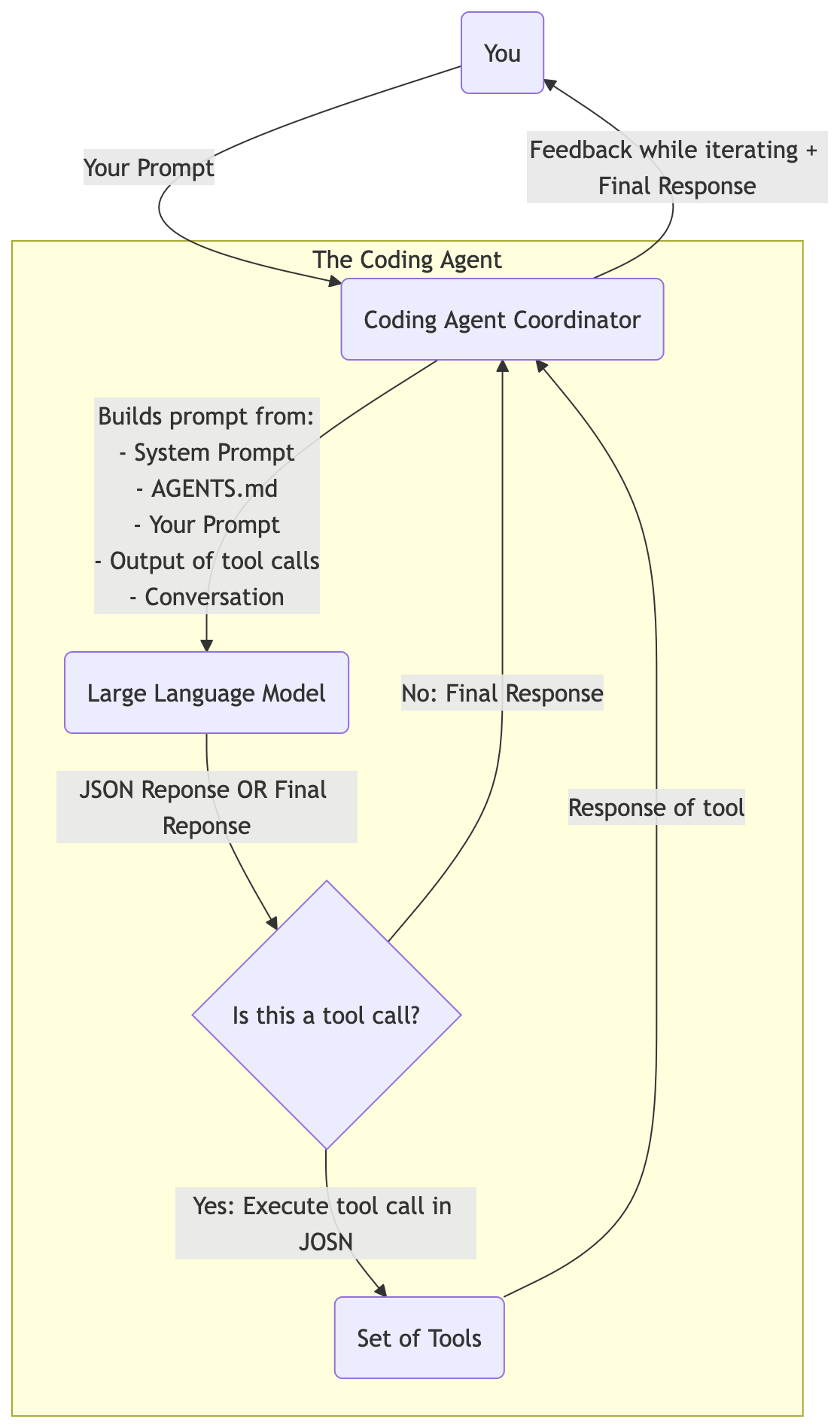
Do note: the LLM will use token caching, i.e., as long as the next prompt is an extension of the former, it will only need to compute on the novel part and re-use the computation of the processing of the prefix of the prompt.
AGENTS.md
A coding agent has a system prompt. The prompt that is always included and instructs the LLM to behave like a developer.
You can fine-tune/tweak the behaviour of the coding agent, by writing an AGENTS.md file. This file will also be included in the context for the LLM.
Skills
The skills specification defines a skill as a Markdown file at the minimum, with an optional set of scripts, references and other assets.
The Markdown file, which must be named SKILL.md, is like an
AGENTS.md, in that it contains instructions. Instructions on when to
use the skill, i.e., what is it about. Instructions about what the
skill should do (the bulk of the SKILL.md). And some more metadata on
what the skill can do, e.g., allowed-tools.
A skill is not included in the request from coding agent to LLM,
unless the skill is requested by the LLM. Then the SKILL.md is
included in the context, together with access to the scripts and
assets defined in the skill.
Sub-Agent
A sub-agent is a lot like a skill. It is at the bare minimum a Markdown file with instructions.
The difference is that a sub-agent can use a different model and has its own context. The work of the sub-agent is thus not included in the “main context” of your coding agent. Only the output will be included.
Sub-agents are great for things like debugging code. It potentially requires quite some steps, that produce a lot of tokens in the context. And the output can be a lot smaller.
Conclusion
Coding Agents are LLM-in-a-Loop. The LLM is the same for everyone. Thus it will generate code that was most probable in its training dataset (typically GitHub).
To make the experience more to your taste, you need to add
steering. Steering is done by giving context to the model. The context
is built up from the AGENTS.md (general guidelines), prompt
(specific directions) and what the LLM explores in your codebase
through toolcalls.
Sub-agents can help you when you need to plough through a lot of text, but are looking only for a small nugget of information. The sub-agent can be forked from you main context, to not pollute it.
Remember, context is king. Without context an LLM just repeats what it read most during training.